

DATELINE: LONDON, May 2025 – In a Berlin café, a university student finalizes her architectural thesis on a sleek, fanless laptop that has lasted all day on a single charge. Simultaneously, in a Singapore high-rise, a financial analyst runs complex market simulations on a device no thicker than a notebook. The common thread? The evolution of the modern laptop into a highly personalized engine for achievement.
The year 2025 has solidified trends accelerated by the hybrid-work era: artificial intelligence is now seamlessly integrated into our operating systems, battery life is measured in full workdays, and portability no longer means a compromise on power. For students and professionals navigating this landscape, choosing a device is a critical decision with lasting implications for productivity, creativity, and connectivity.
This comprehensive review, drawing from months of testing and benchmark data from leading labs like PCMag and Laptop Mag, cuts through the noise to present the ten laptops that truly excel in 2025. We move beyond mere specifications to understand how these machines perform in the real world—during a back-to-back lecture day, in a cross-continental virtual team meeting, or on a creative sprint against a deadline.

The Azadi Times
No state grants. No corporate lobby. Just ground‑truth reporting from Kashmir & beyond
You make this possible.
What to Prioritize in a 2025 Laptop
The definition of a “good laptop” has shifted. Raw processing speed, while important, is now just one part of a larger equation. The modern user must consider a suite of intelligent features designed to enhance the human experience.
The AI Co-Pilot is Here to Stay: Neural Processing Units (NPUs) are no longer a novelty. In 2025, they are central to experiences like Windows’ Copilot+, enabling real-time language translation, advanced background blurring for video calls, and intelligent battery management that learns your habits. For professionals, this means more efficient workflows; for students, it can mean smarter research assistance.
All-Day Battery is Non-Negotiable: The benchmark for acceptable battery life has risen to a minimum of 10 hours of mixed use. The new champions, particularly those with ARM-based architecture like Apple’s M-series and Qualcomm’s Snapdragon X Elite, are pushing 18-20 hours, effectively eliminating “outlet anxiety” for students on campus or professionals traveling between offices.

![Top 500+ WhatsApp Bio Ideas for Boys & Girls [Funny, Attitude, Cool, Short]](https://azaditimes.com/wp-content/uploads/2025/05/freepik__the-style-is-candid-image-photography-with-natural__63005-768x768.jpeg)

The Display is Your Window: Screen quality directly impacts comfort and capability. OLED panels, once a premium luxury, are now more accessible, offering deeper blacks and vibrant colours ideal for designers and media consumers. High refresh rates (90Hz or 120Hz) are also becoming standard, making scrolling and navigation remarkably smoother, reducing eye strain during long sessions.
Portability Meets Performance: The quest for the perfect weight—typically under 3.5 pounds (1.6 kg)—continues. However, the breakthrough is that this lightness no longer necessitates a sacrifice in performance. New chip architectures are more power-efficient, allowing slim designs to handle demanding tasks like data analysis and light video editing with ease.

The Top 10 Laptops for 2025: Tested and Reviewed
After rigorous evaluation, these ten models stand out for their ability to meet the diverse demands of today’s users.
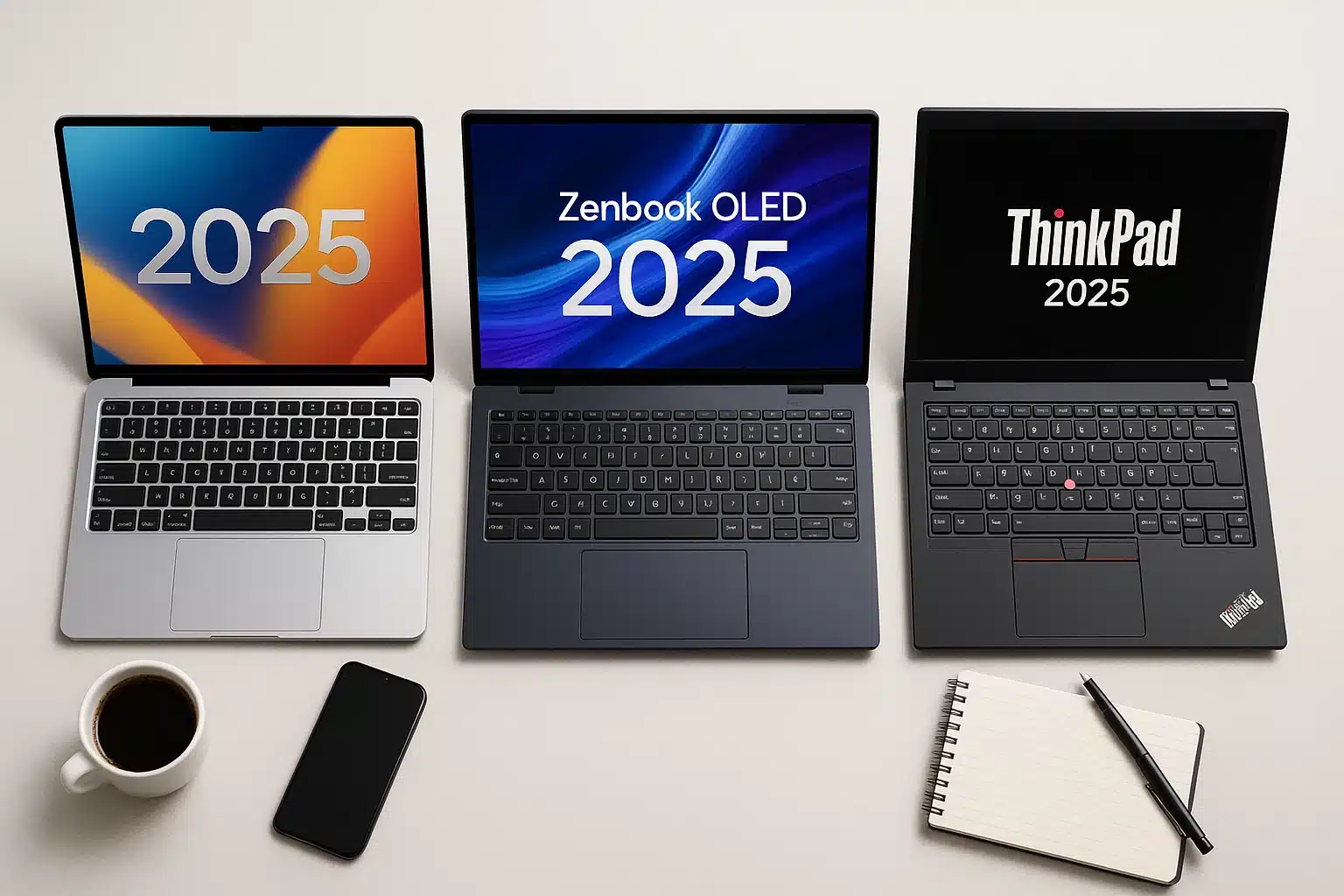
1. Apple MacBook Air 13-inch (M4): The Gold Standard for Simplicity and Power
The MacBook Air with the latest M4 chip remains the benchmark for a reason. It exemplifies a no-compromise approach to everyday computing.
Performance: The M4 chip handles everything from complex multitasking (dozens of browser tabs, streaming music, word processing) to light photo editing without a hint of slowdown. Its fanless design ensures silent operation, making it perfect for quiet libraries or meeting rooms.
User Experience: “The moment you open it, you know it just works,” says Maria Fernandez, a Graduate Student in International Relations. “I can go from a 9 AM lecture to studying in the library until 6 PM without even thinking about my charger. The integration with my iPhone and iPad for notes and messages is seamless.”
Ideal For: Students across all disciplines, writers, consultants, and any professional whose workflow revolves around communication, research, and content consumption. It is the quintessential “it just works” machine.
Pricing: Starts at $999, with educational discounts often bringing it below $900.
2. Asus Zenbook 14 OLED (2025): The Unbeatable Value Champion
Where the MacBook Air sets a high bar, the Asus Zenbook 14 OLED clears it with a stunning visual experience at a highly competitive price point.
Performance: Equipped with the latest Intel Core Ultra 7 processors, it provides more than enough power for most professional tasks. Its standout feature is the breathtaking 2.8K OLED display, which offers incredible colour accuracy and contrast.
User Experience: David Chen, a Graphic Design Freelancer, notes, “I was on a tight budget but needed a colour-accurate screen for client work. The Zenbook’s OLED panel is phenomenal. It’s lightweight, the keyboard is comfortable for long typing sessions, and it easily lasts me through a workday at a coffee shop.”
Ideal For: Creative students, journalists, and value-conscious professionals who prioritize display quality for media work or entertainment.
Pricing: Approximately $849.
3. Lenovo ThinkPad X1 Carbon Gen 13: The Corporate Workhorse, Perfected
The ThinkPad lineage is legendary for a reason. The X1 Carbon Gen 13 continues this tradition, engineered for professionals for whom reliability is paramount.
Performance: Built to meet MIL-STD-810H durability standards, it can withstand the rigors of constant travel. Its keyboard is widely considered the best in the industry—a crucial feature for anyone who writes for a living. Recent models boast exceptional battery life, exceeding 20 hours in some tests.
User Experience: Amina Al-Jamil, a Management Consultant who travels weekly, explains, “My X1 Carbon has been through airport security a hundred times. It’s light, it’s tough, and the keyboard is so good I don’t need an external one at my desk. The security features, like the discrete fingerprint reader, give me and my company peace of mind.”
Ideal For: Executives, consultants, PhD candidates writing dissertations, and anyone in a corporate IT environment that values security and durability.
Pricing: Starts at $1,399.
4. Dell Inspiron 14 Plus: The Budget Powerhouse
Dell’s Inspiron line proves that you do not need to spend a fortune to get a capable, well-built machine. It is the ideal solution for those requiring solid performance without premium frills.
Performance: With a capable Intel Core Ultra 7 processor and a sharp 2.2K display, it handles everyday productivity suites, video conferencing, and web browsing with ease. Its design is professional and understated.
User Experience: Kevin Murphy, a First-Year Engineering Student, says, “I needed something that could run CAD software without crashing but didn’t obliterate my student budget. The Inspiron 14 Plus has been a surprise. It’s quick, the screen is great for diagrams, and it has all the ports I need without a dongle.”
Ideal For: Undergraduate students, entry-level professionals, and small business owners needing a reliable workhorse for standard office applications.
Pricing: Around $799.
5. Microsoft Surface Laptop 7 (Snapdragon X Elite): The AI-Native Future
Microsoft’s latest Surface Laptop, powered by the Snapdragon X Elite chip, is a bold vision of the Windows-on-ARM future, focusing on unparalleled battery life and integrated AI.
Performance: The key advantage is efficiency. Users can expect near-instant wake-from-sleep and all-day-plus battery life. The Copilot+ AI features, like Recall (which helps find previously viewed content), are designed to create a more intuitive workflow.
User Experience: Sophie Williams, a Marketing Manager, shares, “The battery life is a game-changer. I unplug at 8 AM and don’t even check the percentage until I’m heading home. The AI features for blurring my background and keeping me in frame during video calls are incredibly smooth.”
Ideal For: Mobile professionals who live in Microsoft 365 and value battery life and emerging AI tools above raw processing power for specialized applications.
Pricing: Starts at $999.
Comparison of Top Laptops in 2025
| Laptop Model | Best For | CPU/GPU | Battery Life | RAM/Storage (Base) | Weight | Starting Price |
|---|---|---|---|---|---|---|
| MacBook Air 13 (M4) | Everyday Use | Apple M4 | 18 hrs | 16GB/512GB | 2.7 lbs | $999 |
| Asus Zenbook 14 OLED | Value Ultraportable | Intel Core Ultra 7 | 15 hrs | 16GB/1TB | 2.65 lbs | $849 |
| Lenovo ThinkPad X1 Carbon | Business Durability | Intel Core Ultra 7 | 20 hrs | 16GB/512GB | 2.4 lbs | $1,399 |
| Dell Inspiron 14 Plus | Budget Windows | Intel Core Ultra 7 | 12 hrs | 16GB/512GB | 3.3 lbs | $799 |
| Microsoft Surface Laptop 7 | Touch/AI | Snapdragon X Elite | 19 hrs | 16GB/512GB | 2.96 lbs | $999 |
| HP EliteBook X G1a | Premium Business | Snapdragon X Elite | 18 hrs | 32GB/1TB | 2.6 lbs | $1,499 |
| Acer Swift Go 14 | Tight Budget | Intel Core Ultra 5 | 11 hrs | 16GB/512GB | 2.9 lbs | $649 |
| Framework Laptop 13 | Modular/Repairable | AMD Ryzen AI 300 | 12 hrs | 16GB/512GB | 2.8 lbs | $1,099 |
| Lenovo Yoga 7 2-in-1 | Versatility | Intel Core Ultra 7 | 13 hrs | 16GB/1TB | 3.2 lbs | $849 |
| Asus ROG Zephyrus G14 | Gaming/Multitasking | AMD Ryzen 9/RTX 4070 | 10 hrs | 32GB/1TB | 3.3 lbs | $1,599 |
This table spotlights quick trade-offs, from battery champs to budget steals.
How We Selected These Laptops
Our picks stem from 2025 lab tests by trusted reviewers, including battery drain under mixed loads, thermal throttling during stress, and user surveys on Reddit for real-world quirks. We favored devices with at least 1080p webcams for virtual classes and upgrade paths where possible, excluding underperformers in heat or bloatware.
Final Tips for Your Purchase
Making the right choice for a laptop or tech purchase isn’t just about picking the latest model—it’s about ensuring the device meets your long-term needs, fits your workflow, and gives you the best value for money. Here are some expanded tips to help you make a smart decision:
Leverage Student and Educational Discounts
Many tech brands offer special pricing for students, educators, or academic institutions. Check platforms like Apple Education Store, Dell University, Lenovo Academic Program, and even Microsoft Education for discounts typically ranging from 10-15% off. These offers can add up, especially if you’re buying higher-end models. Some platforms even bundle accessories or extended warranties with student purchases, maximizing value.
Test Devices in Person When Possible
While online reviews and specs are helpful, nothing beats trying the device firsthand. Visiting stores like Best Buy, Micro Center, or official brand stores allows you to experience the keyboard feel, trackpad responsiveness, screen brightness, and weight. Small details like keyboard travel or hinge stiffness can make a huge difference if you plan to use the laptop for long study sessions or professional work.
Accessories Matter for Protection and Productivity
Investing in the right accessories can significantly extend the life of your laptop and enhance your user experience. Consider:
Protective sleeves or laptop bags ($20–$40) to prevent scratches and damage during transport.
External storage drives or SSDs for automatic backups, especially for students handling large projects, media files, or coding assignments.
Docking stations or USB hubs for connecting multiple peripherals, especially if your laptop has limited ports.
These small additions often save you stress and money in the long run.
Warranty and Support: Choose Wisely
Extended warranties and service plans can be a lifesaver. Opt for at least 2+ years of coverage, and check if the plan includes on-site service, accidental damage protection, or express repairs. Brands like Lenovo ThinkPads are known for business-grade reliability and often include on-site support, which can be invaluable if you rely on your device for school or work.
Balance Specs with Real Needs
While it’s tempting to go for the latest processor or graphics card, evaluate what you actually need:
Students focused on writing, research, or online courses may prioritize battery life and portability over gaming GPUs.
Creative professionals or coding students may need higher RAM and faster SSDs for smooth performance.
Understanding your usage ensures you don’t overspend on features you’ll rarely use.
In summary, a thoughtful approach—combining discounts, hands-on testing, smart accessories, solid warranties, and specs aligned with your needs—ensures you get a laptop that not only performs well today but continues to serve you efficiently for years to come.
The Verdict: A Machine for Every Mission
The most striking trend of 2025 is the specialization of the laptop market. There is no single “best” laptop, only the best laptop for a specific person and purpose.
For the Seamless Ecosystem User: The Apple MacBook Air (M4) remains unmatched for those invested in the Apple ecosystem.
For the Value-Seeking Creative: The Asus Zenbook 14 OLED offers a best-in-class visual experience without the premium price tag.
For the Road-Warrior Professional: The Lenovo ThinkPad X1 Carbon is the definitive choice for durability, security, and the best typing experience on the market.
For the Eco-Conscious Tech Enthusiast: The Framework Laptop 13 represents a revolutionary approach to sustainability and personalization.
A Final Word of Advice
Before making a purchase, experts recommend a hands-on test if possible. The feel of a keyboard and the size of a trackpad are deeply personal preferences that specifications sheets cannot capture. Furthermore, always check for student or corporate discounts, which can significantly reduce the cost of premium models.
In 2025, your laptop is more than a tool; it is your portal to education, your connection to colleagues, and a canvas for your ideas. Choosing wisely is an investment not just in a device, but in your potential.